Category: Tech

  • Rooting most HTC phones with the Miui rom

    Rooting most HTC phones with the Miui rom

    When I got my new job they gave me a HTC Incredible, So here I am carrying around 2 phones like I’m some drug dealer. ha. My idea was to port my old number to google voice and disconnect my old service, saving me 80 bucks a month 🙂

    After that was done here I am stuck with this plain jane HTC Incredible. After doing some google searching I stumbled upon unrevoked.com. They make an app that installs on windows, OSX and linux which will install recovery and the rom of your choice, very painless. I installed some rom, don’t remember which one, but I didn’t really like it. After more searching for something different, I found Miui, A rom that kinda looks like the iPhone.
    This rom is my favorite rom i have ever played with. It’s very good on battery life, it’s the most different looking rom i have ever seen, and it has transition effects when your flipping through your screens. It’s definitely a rom worth checking out. So if your thinking about rooting your HTC, go to unrevoked and download Miui, it’s very straight forward, not hard to do at all.
    unrevoked.com
    miuiandroid.com/roms/

  • Hype!

    Hype!

    Finally!! A Hype Machine app for android. It has the ability to play back the latest blogged, popular, loved, friends’ songs, and friends’ history. You can share and be redirected to the blog that originally posted the song. You can also search, the only thing you can’t do is download tracks straight from the app it’s self. Good job @mattbriancon for making such an awesome app!

  • Appsec Tutorial Series

    Appsec Tutorial Series

    Here is an interesting set of videos from owasp.org for all you web developers out there..Should be a good series when all the videos are done.

    [youtube]http://www.youtube.com/watch?v=CDbWvEwBBxo&feature=youtu.be[/youtube]

    youtube.com/user/AppsecTutorialSeries

  • Motorola Xoom

    Motorola Xoom

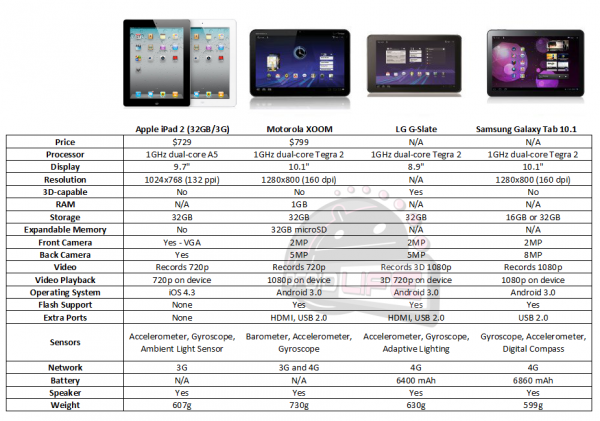
    If anyone knows me well they know how much of a nerd I can be, and the Motorola Xoom definitely brings that out in me. The Android OS was the best thing that could ever come out for smartphones and tablets. Don’t get me wrong I like Apple products, but their licensing restrictions are a bitch, and customizing your Ipad/Iphone or Macbook is nearly impossible. Microsoft has to much damn money so I refuse to give them anymore, unless I’m not paying for it, ha, and they should just stay out of the smartphone market anyways. The Ipad2 comes out March 11th and i won’t be buying it, and when i do decide to upgrade my macbook I will searching craigslist. But enough with my soapbox on Apple, just take a look at the posted video of the Xoom and specs of the hardware compared to the Ipad, which really don’t matter when it comes down to real world usability, but look at this thing it’s freaking badass!

    [youtube]http://www.youtube.com/watch?v=BGtXmtAzzQw[/youtube]

  • CactiEZ

    CactiEZ

    CactiEZ is a self installing Linux Distribution based off CentOS that sets up and configures a customized Cacti install. Everything is designed to be completely automated and working directly out of the box. This compact distro is loaded with extra features such as Syslog and Netflow data collection, Weathermaps, Reports, Auto Discovery, Router Config backup, Nagios, and much more! Both 32 Bit and 64 Bit installations are possible from the same CD.

    I Installed CactiEZ in VMware server which was quick and painless. I followed the tutorials for Netflow (only supports version 5 as of now) then I had pretty ugly looking data, but i could at least see the IPs that were generating the most traffic to my web server and the “hackers” trying to log into my box over SSH with their kiddie scripts using root as the username over and over again, ha. After enabling SNMP on my servers and adding the servers to cacti, importing some windows templates, then setting up some graphs, I was able to see stats on IIS traffic compared to normal traffic leaving the NIC.

    Cacti isn’t as intuitive as I would like it to be, but after some playing around with it, I kinda figured it out. On the bright side it is free!

    Cacti Plugin Flowview 0.7 Walk Through

    http://cactiez.cactiusers.org

    Netflow/flow viewer tutorial

  • My Top 5 Android Apps

    My Top 5 Android Apps

    5vpn lets you connect to a VPN in 5 clicks. It provides a shortcut to the built in VPN settings, in addition it saves your password so you only have to write it once.

    transdroid is a torrent client manager for ”Torrent, Transmission, rTorrent, Vuze, Deluge 1.2+ or BitTorrent 6. You can show and manage torrents, add them via URL, RSS feed or integrated search. A home screen widget is included.

    andFTP is a full FTP client with SFTP and FTPS support.

    XiiaLive allows streaming of multiple audio formats, aac+, m3u, pls, mp3, mp4, mp4a and mpeg. Also gives users the ability to easily surf the SHOUTcast directory.

    mAnalytics allows you to view your basic Google Analytics stats on your phone. Supports multiple accounts, profiles, basic statistics and charts for visits and pageviews. For people who needs more stats info, a pro version is available which also includes a widget.

  • Bypassing your company’s web filter

    Bypassing your company’s web filter

    are you trying to go to facebook or watch porn at work and are being blocked by your company’s firewall or web filter?

    SSH tunneling is your way to get unfiltered web access at work, just don’t get caught.

    The ssh daemon/service is usually more known with Linux systems. When SSHed in at work, I had a couple of the guys that were more familiar with linux see my command shell to my windows box and ask “are you SSHed into a windows box?” and I reply “why yes I am”

    So this is what you need:

    one internet connection
    one windows box (xp will work, im pretty sure these two programs install on XP)
    winSSHD
    CCproxy
    SSH client (putty, openSSH)
    a router/firewall that can NAT/port forward TCP port 22

    Download winSSHD here and CCproxy here. Install Both.

    winSSHD can be left alone with default configuration. CCproxy has to be configured to run as a service and a port, i used 8080.

    Port forward/NAT TCP port 22 to your SSH server.

    On your workstation at work or school. install putty or openSSH client. I use openSSH, it’s command line. OSX already has SSH client commands installed but I use Jellyfissh to manage my SSH tunnels.

    once installed open a command window and type:
    ssh -f xx.xx.xx.xx(your public IP) -L 8080:(IP address of the SSH server):8080 username(username on server) -N
    The command should look something like this:
    ssh -f 12.63.58.112 -L 8080:192.168.0.2:8080 administrator -N
    It should say something about a key, just type yes.
    then it should ask you for a password. if it failed it will tell you, if it connected it won’t say anything.

    Now you have to configure your browser to use a proxy on the loopback address(127.0.0.1) and use port 8080.

    Now if you go to ipchicken you should see the IP address of your internet connection at home and not your works IP address.

  • Diaspora

    Diaspora

    A new way to access your social networks.

    www.joindiaspora.com

  • Google Analytics

    Google Analytics

    Have a website linked to Google Analytics?

    Then check out this website

  • Android OS with SonicWALL L2TP server

    Android OS with SonicWALL L2TP server

    The main thing about the droid is that is uses xauth, DES for phase 2 of the IPsec negotiation, and L2TP has to be configured on the Sonicwall.

    On the Droid the settings are pretty basic.

    In the Droid go to settings > Wireless & Networks > VPN settings

    Add VPN > add L2TP/IPsec PSK VPN

    VPN name: office

    VPN server: vpn.office.com or IP address

    IPsec pre-shared key: enter the shared secret off the general tab of the WAN GroupVPN

    Make sure the L2TP secret is disabled

    The DNS search domains is optional .

    Sonicwall configuration:

    On the Sonicwall go to VPN > settings and edit the WAN GroupVPN. On the General Tab make up a pre-shared key.

    On the proposal tab change the encryption for phase 2 to DES. You can leave the lifetime at defaults.

    On the Advanced tab, enable XAuth and set the user group to Trusted users.

    On the Client tab, allow connects to: all secured gateways, and enable set default route as this gateway.

    Now under VPN > L2TP server, configure a L2TP IP pool that is on a different subnet that your LAN. L2TP has to route.

    Go to Users > Local Users. Add a new user, goto the VPN access tab and give the user access to firewall subnets, L2TP pool and WAN Remote Access Networks.

    Make sure you reconfigure a default outbound NAT policy to nat the L2TP clients out. This can be done just by changing the inbound interface to any. Some versions of firmware will make a L2TP outbound NAT policy for you.

    If you run into any issue don’t forget to check the logs on the sonicwall.

    Sorry i don’t have any pretty pictures for you to follow. If you have any issues please don’t contact me. I will not answer.